

Pak het Auto's.7z bestand uit met als inhoud deze Lees eerst.txt, alle bestanden.jpg, Bewegende pijlen.jpg en Auto's op tankje 2BWeg.rwp bestandje.
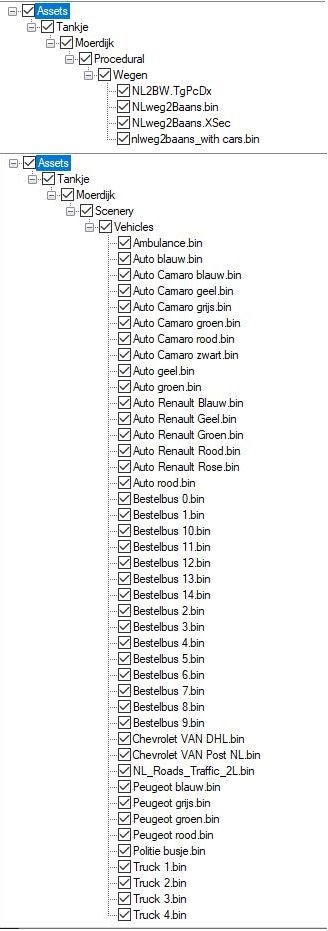
Alle bestanden.jpg geeft aan welke bestanden in de .RWP zitten.
Het Auto's op tankje 2BWeg.rwp bestand installeer je door Utilities.exe te openen wat in de Root van Railworks te vinden is.
Is dat succesvol verlopen dan staat oa. in de lijst van de Route editor deze regel:
"NLRoad2Lanes_with cars".
Selecteer nu deze weg om te leggen, is dat klaar sla dan op.
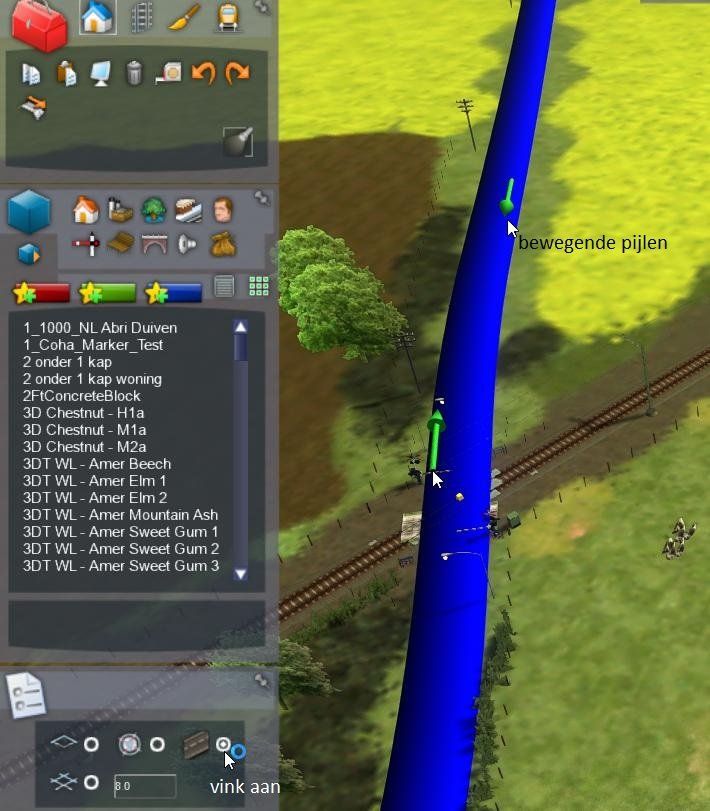
Zorg wel als route bouwer dat je in de route editor bewegende pijlen over de weg heen ziet gaan bij het maken, (zie Bewegende pijlen.jpg)
is dat niet het geval dan komen er sowieso geen auto's op de weg en moet je dat eerst goed zien te krijgen.
Tot slot; mijn dank gaat uit naar Frison en tankje om dit mogelijk gemaakt te kunnen hebben.
Veel plezier met "Auto's van Frison rijdend op een weg van tankje".
Ps. het is een op zichzelf staand bestand, ofwel een route bouwer kan het gebruiken zonder het 't HvN assets bestand
Benodigde addons / Required addons:
Frison:
- Scenery Pakket
Extract the Auto's.7z file. It contains the following: Lees eerst.txt, all files.jpg, Bewegende pijlen.jpg, and the Auto's op tankje 2BWeg.rwp file.
The all files.jpg image shows which files are included in the .RWP archive.
Install the Auto's op tankje 2BWeg.rwp file by opening Utilities.exe, which can be found in the RailWorks root folder.
If the installation was successful, the following entry will appear in the Route Editor list:
"NLRoad2Lanes_with cars"
Select this road to place it. When you are finished, save your work.
As a route builder, make sure that in the Route Editor you can see moving arrows over the road while placing it (see Bewegende pijlen.jpg).
If this is not the case, no cars will appear on the road, so you must first make sure that this is working correctly.
Finally, my thanks go to Frison and tankje for making this possible.
Enjoy "Frison’s cars driving on a road by tankje."
P.S. It is a stand-alone file, meaning a route builder can use it without the HvN assets file.
Required addons:
Frison:
- Scenery Pakket
Je mag alleen een beoordeling geven nadat je het bestand hebt gedownload.
Er zijn geen reviews om weer te geven.